
Trending now
The 80s Trend ChatGPT Prompt: Exact Text, Line by Line
The 80s trend is a prompt trend — everyone is trading the text. This is the prompt written out properly, what each line is for, the mistake that turns you into a stranger in a perm, and the route where you skip the prompt.
4.6average rating · 4,109 App Store

The 80s Trend ChatGPT Prompt
This is the 80s trend prompt for ChatGPT, ready to paste: “Using the attached photo, keep my face, facial features, skin tone and expression exactly as they are — same person, same angle, do not lighten the skin. Change only the hair, clothes, accessories and setting. Turn this into a mid-1980s studio portrait in the style of an old family album: big hair with volume at the crown, feathered or lightly permed; a shoulder-padded blazer, a wide-collar shirt or a printed silk saree with matching blouse; large earrings or a thin gold chain; direct on-camera flash with a small hard shadow behind the shoulder; soft film grain; slightly faded warm colour; a plain mottled studio backdrop. Photorealistic.”
The 80s trend is unusual because the prompt is the whole trend: there is no filter to install, so the text people share is the product, and small differences in that text decide whether the result is you in the mid-80s or a well-dressed stranger. The first sentence — keep the face — is the one that does the work. The rest is a checklist of what ChatGPT will decide for you if you stay silent: hair, clothes, accessories, and then the photograph itself, meaning the flash, the grain, the faded colour and the backdrop.
There is also a route with nothing to type. FaceCast has the 80s look built in as a fixed style: upload one photo, tap the style, and the portrait comes back in seconds with your face, skin tone and expression kept and only the hair, clothes, accessories and background moved to the mid-80s. Free on iOS and Android, no prompt, no account to try.
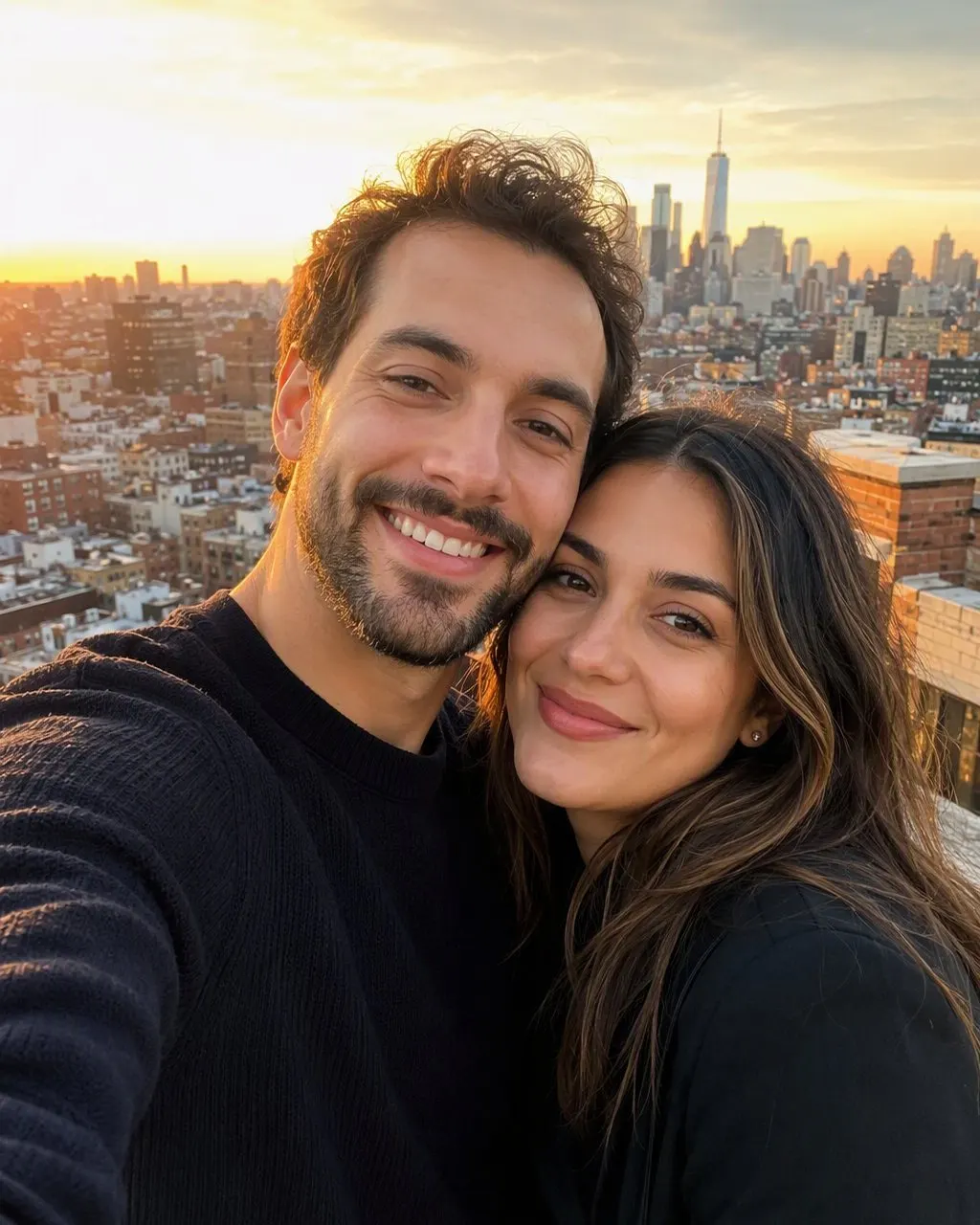


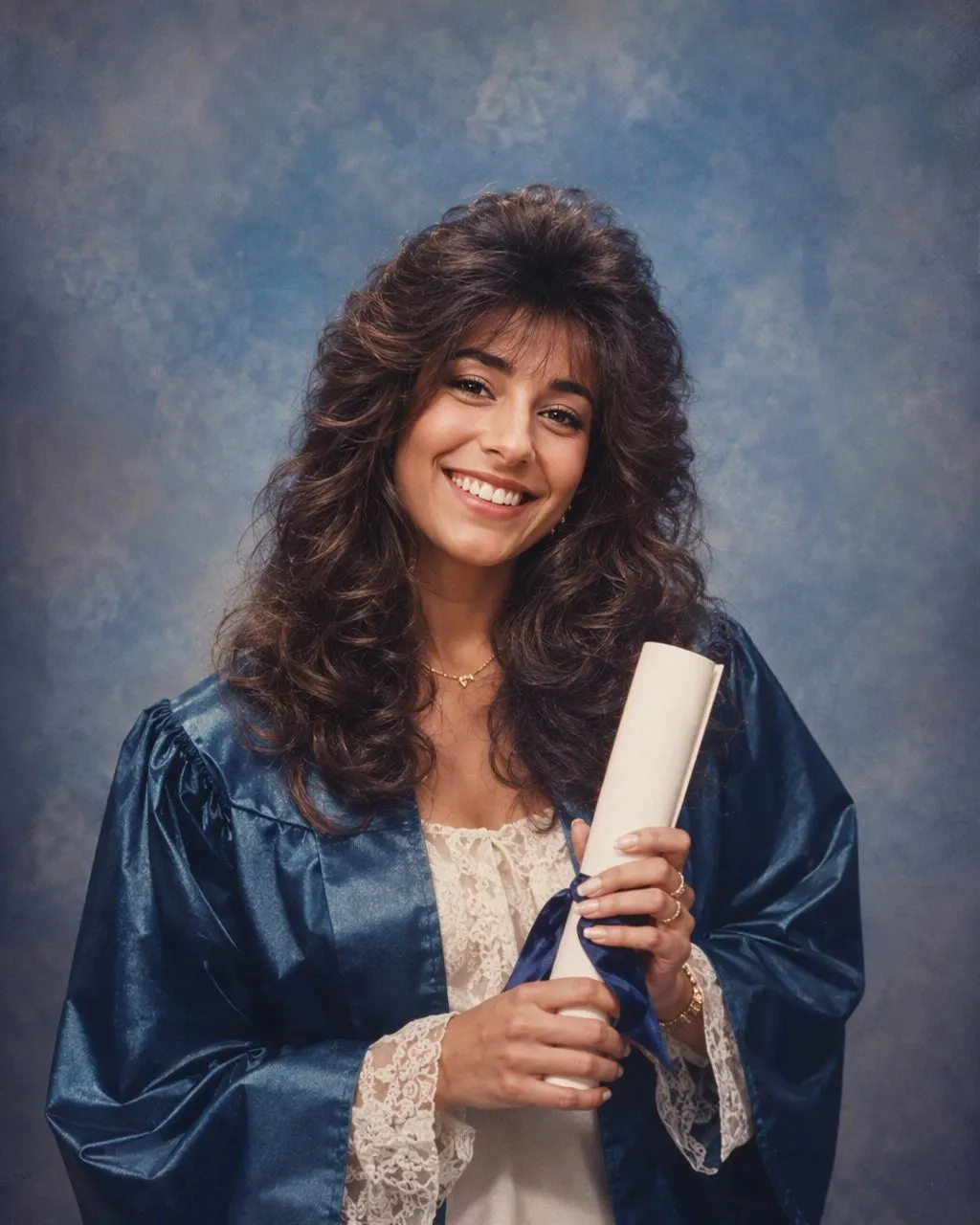
How to Run the 80s Trend Prompt in ChatGPT
Upload the photo, then paste the prompt
Attach a clear front-facing photo first, then paste the full prompt in the same message. A prompt sent without the photo attached makes ChatGPT invent a face from scratch, which is the most common reason a first attempt looks like nobody you know.
Keep the identity line first, edit the middle
Change the clothes and hair to suit you — a kurta, a bindi, a moustache you already wear, a particular saree print — but leave the first sentence intact and at the top. Every adaptation of the trend prompt that works keeps that order.
Compare, correct, or skip the loop
Put the result next to your original and check the jaw, the nose and the eye spacing. If something has moved, reply “the face must match the original photo exactly” and regenerate. If you would rather not do this loop, FaceCast keeps the face on every run and needs no prompt at all.
The 80s Trend Prompt, Line by Line
Each line in the prompt closes off a decision ChatGPT would otherwise make on its own. Knowing what each one does lets you adapt the trend prompt to a couple photo, a photo for men, a photo for girls or a saree portrait without breaking it.
“Keep my face … exactly as they are”
The identity lock. Face, features, skin tone, expression, body shape. Without this line the model dresses a new person in period clothes. With it buried at the end, it is often ignored.
“Do not lighten the skin”
Some models drift towards a paler face along with the warm retro colour grade. Naming it stops it. This is the line Indian users add most often once they have seen the first result.
“Change only the hair, clothes, accessories and setting”
The permission list. It tells the model what it may touch, which is as important as telling it what it may not.
The hair, clothes and accessories lines
Specific pieces beat adjectives: volume at the crown, shoulder pads, a wide collar, a silk saree, large earrings, aviator frames. “Retro” and “vintage” on their own produce a generic sepia wash.
The flash, grain, colour and backdrop lines
This is the part that carries the decade. Most weak results are dressed for the mid-80s and lit like a 2026 phone camera; the direct flash, the grain, the faded warm colour and the mottled studio backdrop are what make it look like a print from a neighbourhood photo studio.
Why the 80s Trend Prompt Changes Your Face
ChatGPT regenerates the whole image on every run. Your prompt describes the result; it does not measure the original. So how closely the new face matches yours depends on the wording, on the rest of the sentence and on the run itself — which is why two people with the same photo and the same prompt get different results, and why your own second attempt differs from your first.
The test is simple: run the same prompt three times on the same photo and compare the jawline, the nose and the distance between the eyes. On most photos at least one of them moves. It moves most on group photos, where one identity line has to hold three or four faces at once.
A fixed style is built differently: the identity handling is the same code on every run, so what changes between two results is the photo, not the sentence. That is a description of the mechanism, not a claim that one route makes nicer pictures — the ChatGPT route gives you more control over the costume; the fixed style gives you the face back every time.
Gemini, Nano Banana, and the Route With Nothing to Type
The same prompt works in Gemini, whose image model goes by the nickname nano banana; nothing about the 80s trend needs a separate Gemini recipe. What differs is housekeeping — how many images your plan allows and how each tool takes a follow-up correction.
FaceCast is the no-prompt route: one photo, one tap, a result in seconds, with the hair, clothes, accessories and backdrop moved to the mid-80s and the face left where it was. It makes a still image only — no video, no ageing anyone, no celebrity faces. Your photo is used only to generate your result; it is not sold or shared for marketing. Upload your own picture, or one everyone in it agreed to, and add a short “made with AI” note when you post it.
Frequently Asked Questions
What is the 80s trend prompt for ChatGPT?+
It is a short text that tells ChatGPT to keep your face, features, skin tone and expression exactly as they are and change only the hair, clothes, accessories and setting to a mid-1980s studio portrait, with a direct flash, soft film grain, faded warm colour and a plain studio backdrop. The full text is at the top of this page.
What is the 80s trend, exactly?+
It is a photo trend where people post a mid-1980s studio-portrait version of a current photo of themselves, usually made with a ChatGPT or Gemini prompt. The face stays the same; the hair, clothes, flash and backdrop move to the mid-80s. The prompt text is what people share, which is why searches for it have overtaken searches for the trend itself.
Why does ChatGPT change my face with the 80s prompt?+
Because ChatGPT regenerates the whole image on every run and holds the face only as tightly as the wording tells it to. Put the identity line first, add “do not lighten the skin”, and if it still drifts, reply that the face must match the original exactly. A fixed style like FaceCast’s keeps the face on every run.
Can I use the 80s trend prompt for a couple or family photo?+
Yes, but add one identity line per person and describe the hair and clothes for each. Photos with two or more faces drift more than single portraits because the same instruction has to hold several faces, so check every jawline after each run.
Is the 80s trend prompt the same in Gemini?+
Yes. The same text works in Gemini, whose image model is nicknamed nano banana. Only the number of images your plan allows and how each tool handles a correction differ; the wording does not.
Is there a way to do the 80s trend without a prompt?+
Yes. FaceCast has the 80s look as a built-in style: upload one photo, tap the style, and the portrait is ready in seconds with your face kept. It is free on iOS and Android, and there is nothing to write or configure.
Skip the Prompt Entirely
Upload one photo, tap the 80s look, and the portrait is ready in seconds. Nothing to write, nothing to configure — free on iOS and Android.
4.6average rating · 4,109 App Store