
Trending now
How to Make an 80s Christmas Photo With AI
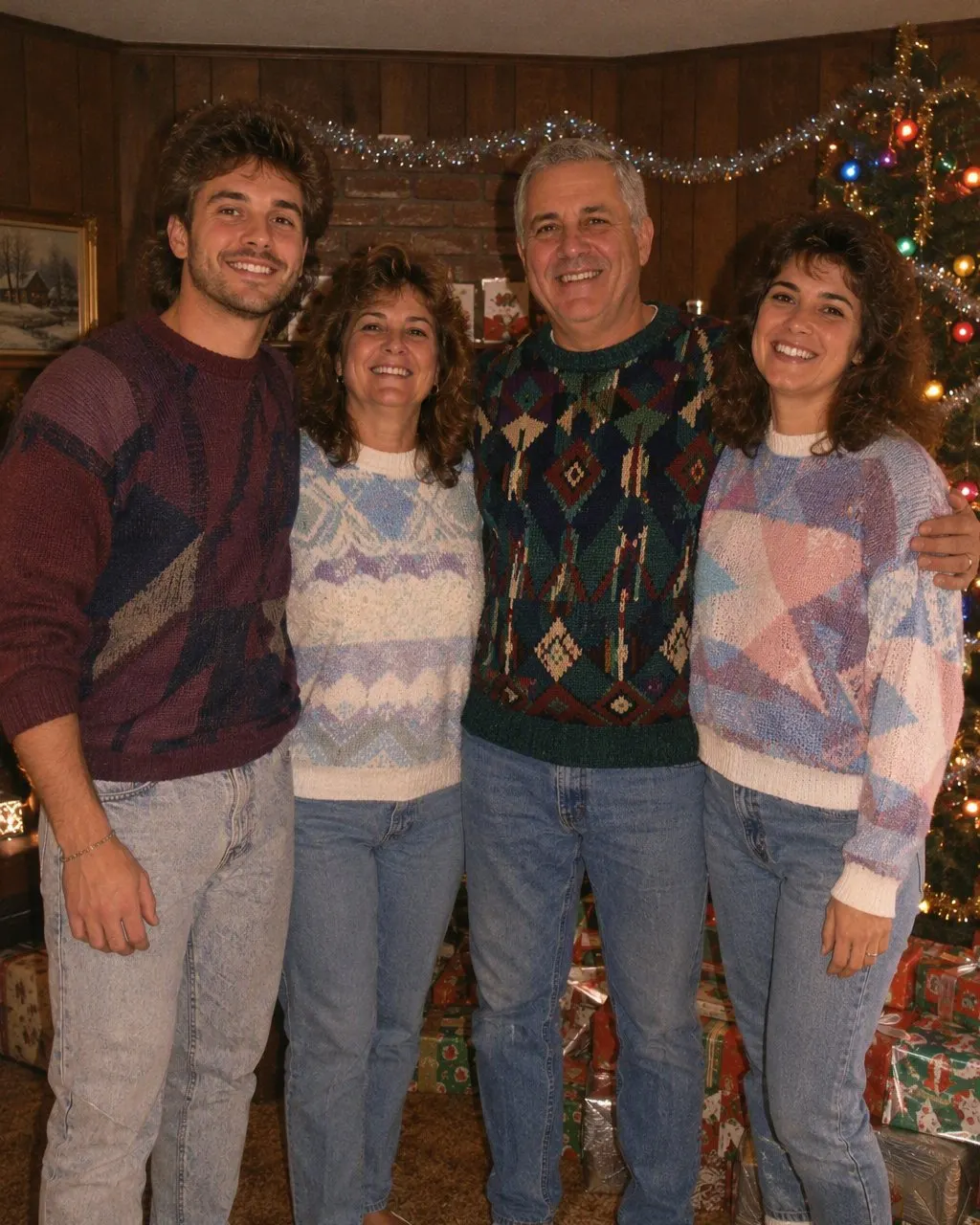
Tinsel and foil garland, big coloured bulbs, a wood-panelled living room and matching knitted jumpers, with a hard flash across the whole scene — and every face exactly as it is.
4.6average rating · 4,109 App Store
The Short Answer
To make an 80s Christmas photo with AI, upload one picture with everyone already in it and choose the 80s look. The portrait comes back in seconds: faces, skin tones and expressions kept, and the hair, clothes and room restyled to a mid-80s Christmas — tinsel, big coloured bulbs, wood panelling, matching knitted jumpers and a direct flash.
Your photo does not have to be a Christmas photo. The setting is part of what gets restyled, so a kitchen selfie or a summer group shot can come back in a decorated living room with a wrapped-gift pile under the tree. What the picture does need is every face visible, front-on and reasonably sharp, because the styling can change a room but cannot invent a face it cannot see.
There is no reason to wait for December to work this out. Choosing the photo is the slow part and the season is the busy part, so decide now which picture you want to use — then make the image the week you actually need it, whether that is for a card, a group chat or a post on the day.




How to Make Your 80s Christmas Photo
Pick one photo with everyone in it
One frame, every face visible and front-on, nobody half-hidden behind someone else, and no sunglasses or hats over the hairline. An ordinary phone photo in even light beats a dim, heavily filtered one every time.
Choose the 80s look
Tap the 80s style and the whole group is restyled at once — hair, knitwear, decorations, the wood-panelled room and the flash. There is no prompt to write and nothing to describe. Free, one tap, no account.
Save it, send it or print it
The picture is ready in seconds. Send it to the family chat, keep it for a card, and add a short “made with AI” note so nobody files it under real family history — which, with this look, they genuinely might.
What a Mid-80s Christmas Photo Actually Looked Like
A mid-80s Christmas photo is a very specific object, and the details are why the look lands instantly rather than reading as generic nostalgia. It was taken indoors, at night, on a camera with a flash on the front, by somebody who was not a photographer. These are the parts that make it read as 1985 rather than as a festive filter.
The tree
Silver tinsel draped in strands rather than tucked in, foil garland, a mix of glass baubles and homemade ornaments, and an angel or a star that leans slightly.
The lights
Big coloured bulbs — fat reds, greens, blues and yellows on a heavy green wire — not the small warm-white fairy lights of a modern tree. This single detail dates a photo faster than anything else in the room.
The room
Wood panelling on the walls, patterned carpet, a heavy fabric sofa, a paper chain across the ceiling and a card display taped around the doorframe.
The clothes
Matching knitted jumpers with a snowflake or reindeer pattern, a red polo neck, corduroy, and a proper collar on anyone who was told to make an effort.
The gifts
A pile of wrapped presents under the tree in shiny foil paper, with curled ribbon and stick-on bows, arranged for the picture rather than as they fell.
The camera
Direct on-camera flash: a bright, slightly hot foreground, hard shadows behind everyone, dark corners, heavy film grain and warm, faded colour like a print that has been in a shoebox since.
The Family Christmas Photo: One Frame, Everyone Visible
A family 80s Christmas photo restyles one picture, so everyone you want in the result has to be in the frame you upload — the app cannot merge separate photos of different people into one group. That makes the choice of source photo the whole job. Look for a frame where every face is visible and turned towards the camera, where the light is even across the group rather than half in shade, and where nobody is behind somebody else’s shoulder.
One sharp, unfiltered photo is worth more than a flattering one. Beauty filters and heavy edits sit underneath the restyle and muddy it, because the look adds its own flash and grain on top; a plain photo gives it clean material to work with. Standing close together helps too — the 80s living-room photo was always tight, with everybody squeezed onto one sofa, and big gaps between people leave awkward empty room behind them.
Agree before you upload. A family photo is not only your photo, and the trend stops being funny for the person who did not know their reindeer jumper was going online. Upload your own picture or one every adult in it said yes to. Children are a separate decision that only a parent or guardian can make: a child’s face is their biometric data, a public post lasts far longer than a season, and the version on this page works perfectly with adults only.
Using an 80s Christmas Photo on a Card
The card version is the same picture with different constraints, and they are worth knowing before December rather than during it. A card wants room around the group for a greeting and a fold, so choose a source photo with a little space above heads and beside shoulders rather than one cropped tight to the faces — a tight crop leaves nowhere for the text to go and forces you to shrink everyone.
Make one test print, or at least view the picture at the size you intend to print, before ordering a stack. The look deliberately carries film grain and faded colour, which is the point on a screen and can read differently on paper depending on the stock and the printer. If the card is going out by post, work backwards from the date you want it to arrive and give the print run more time than you think it needs; if it is going out digitally, none of that applies and you can make the picture the same evening.
A short line on the back or in the caption saying the image was made with AI keeps it honest, and it is expected on most platforms now for realistic-looking edits. It also saves you explaining to an aunt that no, nobody has found a lost roll of film from 1985.
Frequently Asked Questions
How do I make an 80s Christmas photo with AI?+
Upload one photo that already has everyone in it and choose the 80s look. The portrait is generated in seconds: every face, skin tone and expression is kept, and the hair, clothes and setting are restyled to a mid-80s Christmas with tinsel, big coloured bulbs, a wood-panelled room, matching jumpers, a direct flash and film grain. There is no prompt to write and it is free on iOS and Android.
Does my photo need a Christmas tree in it already?+
No. The background is one of the things the style changes, so an ordinary indoor photo — or an outdoor one, or a summer group shot — can come back in a decorated living room with a tree, coloured bulbs and a wrapped-gift pile. What the photo does need is clear, front-on faces in even light.
Does everyone need to be in the same photo?+
Yes. The 80s look restyles one picture, so everyone you want in the Christmas portrait has to be in the frame you upload. It cannot combine separate photos of different people into a single group, and a face that is turned away, blurred or hidden behind someone else gives the styling nothing to work with.
What if Christmas where I am is in summer?+
Then this style is describing a different Christmas from yours. The tinsel, the big coloured bulbs, the wood-panelled room and the knitted jumpers are a cold-weather, indoors, after-dark Christmas, and that is what the 80s look rebuilds whatever you upload — so it will not give you a mid-80s Australian or New Zealand Christmas in the backyard with an esky and bright daylight. It still works on your photo and it still keeps every face; it just puts everyone in a northern living room. If that is not the picture you want, the family and couple pages give you the same era without the Christmas setting.
Can I use it as a Christmas card?+
Yes, with one bit of planning: pick a source photo with a little space above heads and beside shoulders so there is somewhere for the greeting to sit, and view the result at your intended print size before ordering a batch. The grain and faded colour that make it work on screen can read differently on paper depending on the stock.
Should I put my children in the picture?+
That is a decision only a parent or guardian can make, and it deserves a moment of thought: a child’s face is their biometric data, and a public post outlasts the season by years. If you would rather not, the look works just as well with adults only — a couple, adult siblings, parents with a grown-up child.
Is it free, and what happens to our photo?+
The 80s look is free in FaceCast on iOS and Android, and the result comes back in seconds. Your photo is used only to generate that result; it is not sold or shared for marketing. As a rule, upload your own picture or one every adult in it agreed to, and add a short “made with AI” note when you post it.
Put Your Family in a 1985 Living Room
One photo with everyone in it, one tap, and the tinsel, the coloured bulbs and the matching jumpers are done in seconds. Free on iOS and Android.
4.6average rating · 4,109 App Store