
Trending now
How to Make an 80s Glamour Shot With AI
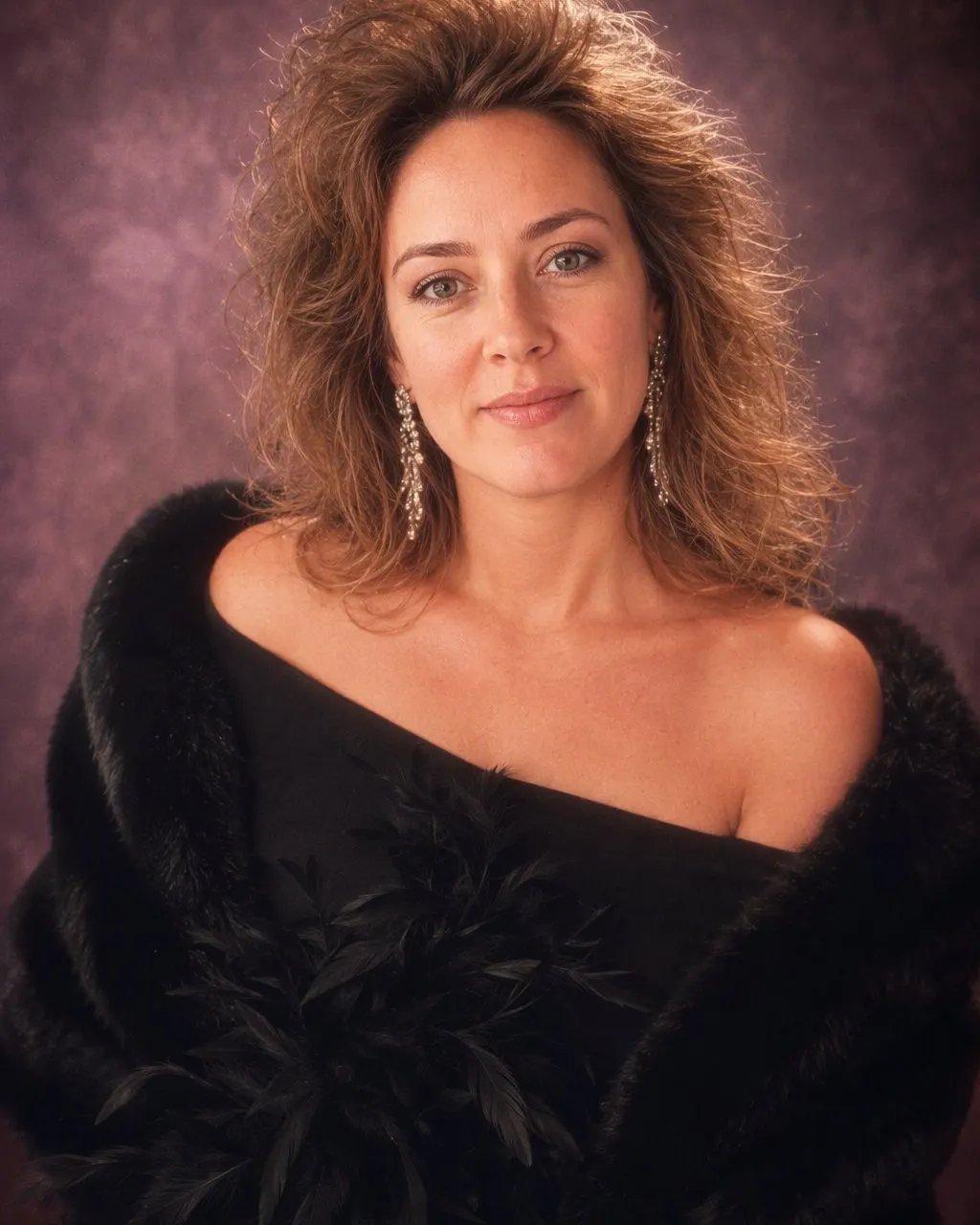
Teased hair the size of the frame, a feather boa, an off-the-shoulder wrap, a mottled backdrop and a soft-focus glow — the mall studio ritual, rebuilt around your own face.
4.6average rating · 4,109 App Store
The Short Answer
To make an 80s glamour shot with AI, upload one portrait, choose the 80s look, and the sitting comes back in seconds. FaceCast keeps your face, skin tone and expression and adds the genre around it: teased hair, a feather boa, contoured makeup, soft focus and a mottled backdrop. It is free on iOS and Android.
The glamour shot was an American mall ritual that ran from the late 80s through the 90s. You booked a slot at a studio between a shoe shop and a food court, and a stylist teased your hair to twice its height, painted makeup from your hairline to your shoulders, wrapped a boa or a fur over a black tube top, sat you waist-up in front of a marbled canvas and shot you through a soft-focus filter. The print came back airbrushed to a glow.
It is a beloved genre, not a joke at anyone’s expense. The pictures are camp on purpose — that was the product, and the people in them knew exactly what they were buying. The restyle plays it the same way: fully committed, warmly, with your own face intact.


How to Make Your 80s Glamour Shot
Upload one clear portrait
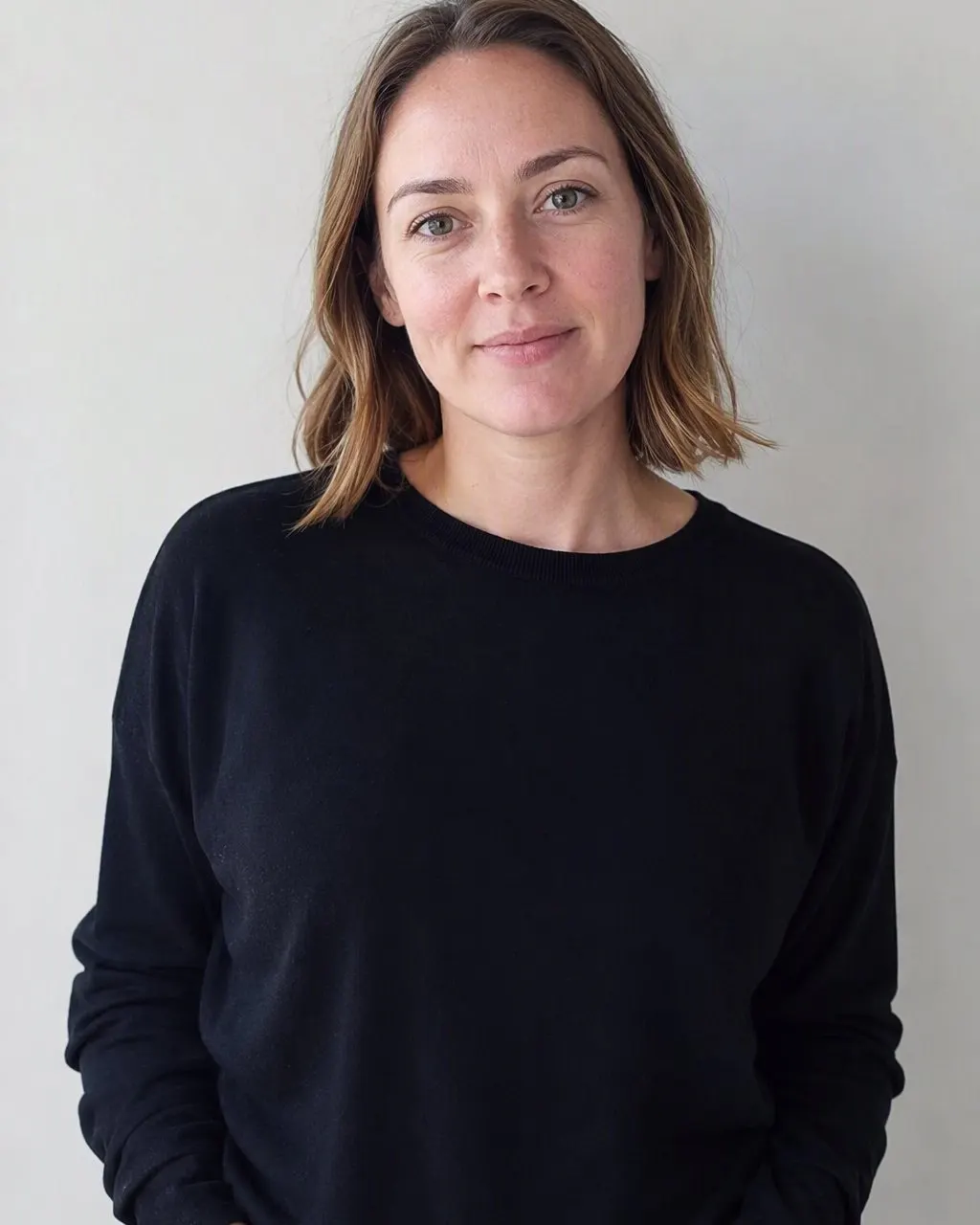
Head and shoulders, facing the camera, in even light. The more of your hairline and shoulders the frame shows, the more the styling has to work with.
Choose the 80s look
Tap the 80s style. The boa, the teased hair, the makeup, the backdrop and the soft-focus glow are all part of the look — there is no prompt to write.
Save and share it
The sitting is ready in seconds. Post it with a short “made with AI” note, ideally next to the unstyled original.
What an 80s Glamour Shot Looked Like
The mall glamour studio ran a house style so consistent that a single photograph from it is recognisable anywhere, decades later. Every element below was deliberate, and all of them are in the restyle.
Hair teased to the edges of the frame
Heavily hairsprayed volume at the crown, curls sprayed out sideways, and often a small fan just off-camera to lift the whole thing while the shutter fired.
A feather boa or a fur wrap
The house props. Draped across bare shoulders, in white, pink or black, with a few feathers deliberately catching the light.
A black tube top under everything
The studio wardrobe was layered over one base garment, so a single sitting could cycle through a boa, a bustier, a leather jacket and a fur without anyone changing clothes.
Makeup from hairline to shoulders
Theatrical, applied well past the jaw so it matched under the lights, with contouring used to shape the face towards an oval and a hard stripe of blush along the cheekbone.
Soft focus and an airbrushed glow
A diffusion filter over the lens to soften lines, then retouching on the print. Highlights bloom, skin goes flawless, and the whole picture glows a half-stop brighter than life.
Waist-up, on a mottled backdrop
The frame stopped at the waist, in front of the marbled blue-grey canvas or a pastel laser backdrop, lit to fall off into darkness at the corners.
Why the 80s Glamour Shot Is Worth Redoing
A glamour shot was one of the few photographs of the era that a person chose for themselves. School photos, weddings and family sittings were all somebody else’s idea; this was an appointment you booked, for an hour where a stylist made a fuss over you and the resulting print went on your own wall or into somebody’s wallet. That is why they are so cheerfully over the top, and why they have aged into something people are fond of rather than embarrassed by.
Restyled, they land the same way. The pleasure is in the total commitment: the boa is not ironic, the hair is not slightly big, the glow is not subtle. A half-hearted version of this look is worse than none at all, which is why the restyle goes all the way — and why it works best on a plain, unglamorous source photo, where the contrast between what went in and what came out is the whole point.
It is also the friendliest of the 80s looks to run as a group. A pair of friends, a mother and her adult daughter, a couple: same boa, same backdrop, same glow, one shared sitting. Free, one tap, no prompt to write and no account to create.
Which Photo to Use for a Glamour Shot Restyle
The styling is dramatic, so the source photo should not be. A calm, well-lit, front-on portrait gives the best result, because everything expressive in the final image is added rather than competed with.
Bare or simple shoulders
A crew neck, a plain top or bare shoulders restyle cleanly into a boa or an off-the-shoulder drape. A bulky coat or a hood does not.
Hair away from the face
The restyle builds volume outward from your real hairline, so a visible hairline gives it a foundation to build on.
Even, soft light
Window light beats direct sun. The glamour look adds its own glow, and it has nowhere to put that glow if half your face is already in deep shadow.
A neutral expression or a small smile
The genre ran on a slight, knowing half-smile. A wide open-mouthed laugh fights the soft focus rather than sitting inside it.
Nothing filtered beforehand
Skip the smoothing filters. Soft focus applied on top of a beauty filter loses the skin texture that keeps the picture readable as a photograph.
Frequently Asked Questions
How do I make an 80s glamour shot with AI?+
Upload one portrait, choose the 80s look, and the sitting is generated in seconds. FaceCast keeps your face, skin tone and expression and adds the genre around it — teased hair, a feather boa, contoured makeup, soft focus and a mottled backdrop. There is nothing to type, and it is free on iOS and Android.
What exactly was an 80s glamour shot?+
A waist-up studio portrait sitting sold in American shopping malls from the late 1980s through the 1990s. Hair and theatrical makeup were done on site, the studio layered boas, wraps, bustiers and jackets over a black tube top, the picture was shot through a soft-focus filter against a marbled backdrop, and the print was airbrushed before you collected it. The best-known chain, Glamour Shots, opened in Dallas in 1988 and grew to roughly 380 mall locations by 1995.
Do I need big hair in my photo already?+
No. The restyle builds the hair itself, working outward from your real hairline. All it needs is a photo where the hairline and the shape of your face are visible — short hair, tied-back hair and long hair all work.
Can two people be in one glamour shot?+
Yes. Upload one photo with both of you in it and the same styling is applied to the pair — matching boas, matching glow, one shared backdrop. Both faces stay exactly as they are, so the joke still lands.
Will it change my face or make me look older?+
Neither. Your face and expression are preserved, and the 80s look does no ageing at all. It produces one still image — no video — and it will not place a celebrity’s face into your picture.
What happens to my photo?+
It is used only to generate your result. FaceCast does not sell your photo or share it for marketing. Upload your own picture, or one the person in it has agreed to, and add a short “made with AI” line when you post the result.
Book Yourself a Mall Glamour Sitting
Upload one portrait, choose the 80s look, and the boa, the glow and the backdrop arrive in seconds. Free on iOS and Android.
4.6average rating · 4,109 App Store