
Trending now
How to Make an 80s Yearbook Photo With AI
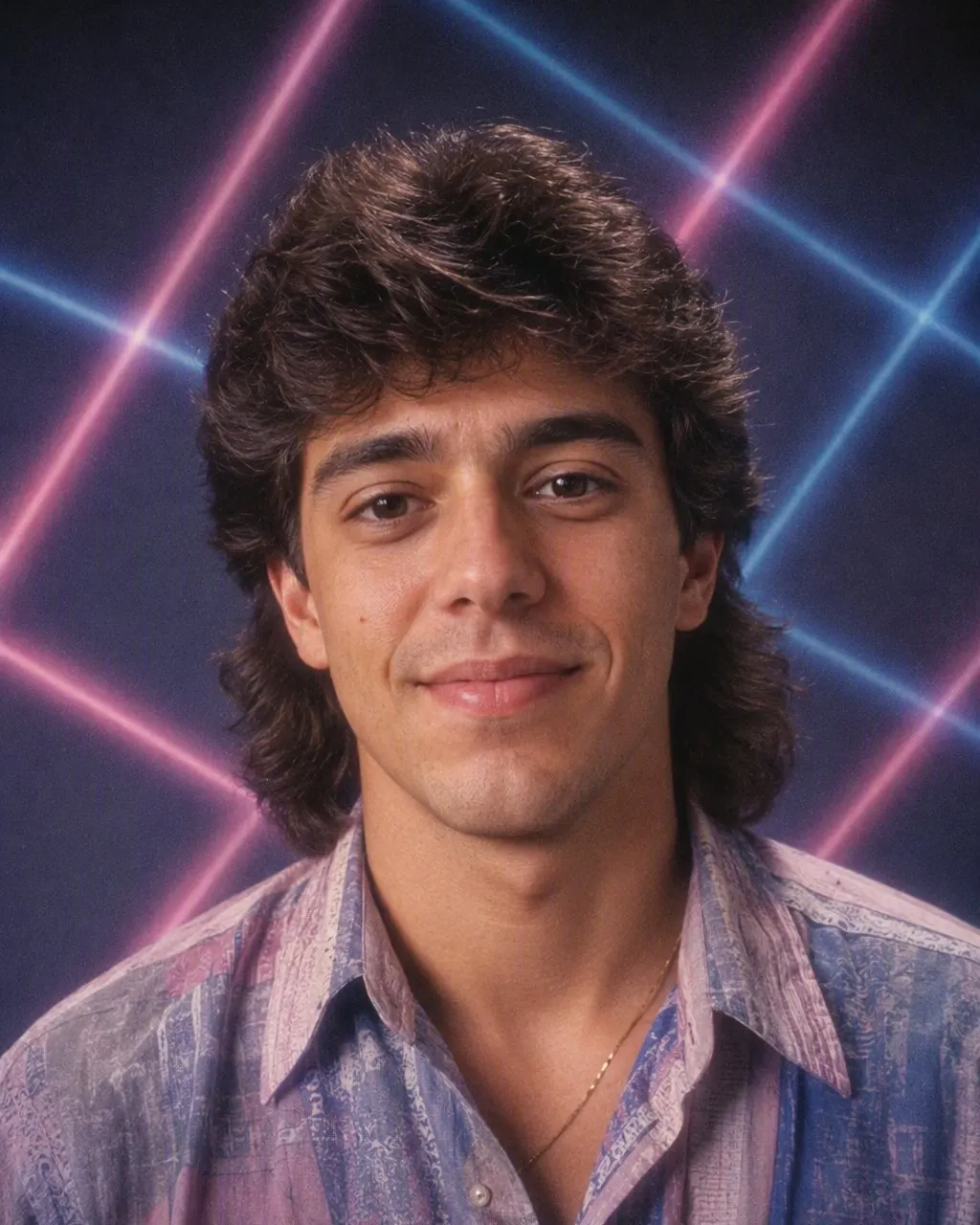
One portrait, one tap, and you are on a mid-80s yearbook page — feathered hair, a collar with opinions, a pastel laser backdrop and a hard flash, with your own face exactly as it is.
4.6average rating · 4,109 App Store
The Short Answer
To make an 80s yearbook photo with AI, upload one portrait, choose the 80s look, and the picture comes back in seconds. FaceCast keeps your face, skin tone and expression and restyles the hair, clothes and backdrop to the mid-80s: feathered layers, a wide collar, a pastel laser backdrop and a hard flash. It is free on iOS and Android.
There is nothing to describe and nothing to configure. A yearbook portrait is the easiest kind of photo to restyle, because it is already the right shape: one person, head and shoulders, facing the camera, evenly lit. Any photo built that way works — a real yearbook headshot, a graduation picture, or a plain selfie against a blank wall.
The result is a single still image. It does not age you, it does not animate, and it does not put anyone else’s face in the frame. Everyone who knows you can still tell it is you; the decade around you is the only thing that changed.




How to Make Your 80s Yearbook Photo
Upload one head-and-shoulders portrait
Face the camera, even light, nothing across your eyes or hairline. A phone photo against a plain wall is ideal.
Choose the 80s look
Tap the 80s style. The hair, the collar, the studio backdrop and the flash are built in — there is no prompt to write.
Save and post it
Your yearbook portrait is ready in seconds. Save it, share it, and add a short “made with AI” note so nobody files it under real school history.
What a Mid-80s Yearbook Portrait Actually Looked Like
A mid-80s yearbook portrait was a formula, shot by a contracted studio in a school gym or cafeteria in about ninety seconds per person. That formula is exactly what makes it so easy to recognise — and so satisfying to put a modern face into. These are the parts the 80s look rebuilds.
The hair
Height at the crown, feathered layers falling back from the face, a deep side part, and enough hairspray to hold all of it under a hot studio light.
The clothes
A wide collar worn outside a sweater, a pastel knit, a blazer with shoulder pads, a thin tie, or a polo with the collar up.
The backdrop
A pastel laser grid, a mottled grey-and-blue canvas, or a plain gradient — the three backdrops nearly every school studio of the era carried.
The pose
A three-quarter turn of the shoulders with the head brought back towards the camera, chin slightly down. The studios posed everyone the same way, and the app reproduces the effect of it.
The camera
Direct on-camera flash, a hot highlight on the forehead, slightly soft focus, visible grain and warm faded colour, like a print that has sat in a drawer for forty years.
Outside the United States
In Australia, New Zealand and Britain the same portrait was shot in school uniform — a blazer, a crest, a tie and a jumper — every year rather than once at the end. If that is the picture you remember, it restyles just as well: the hair, the flash, the grain and the backdrop do the work, and the uniform dates itself.
Which Photo Makes the Best 80s Yearbook Picture
Almost every disappointing result comes down to the photo that went in, not the styling that came out. The app can change your hair, your collar and the wall behind you, but it cannot invent a face it cannot see clearly. Five things fix nearly all of it.
Front-on, head and shoulders
A yearbook frame is tight. Stand close enough that your shoulders fill the bottom of the picture, and look straight at the lens rather than past it.
Even, soft light
Window light or open shade. Hard midday sun carves shadows across the face, and heavy backlight leaves nothing for the styling to hold on to.
Nothing over the hairline or eyes
Take off hats and sunglasses for one frame. The hairline is where an 80s restyle does most of its work, so it needs to be visible.
A plain background
A blank wall, a door, a bedsheet. A busy background gives the model more to unpick before it can put a laser backdrop behind you.
No beauty filter underneath
Upload the unedited version. The app adds its own flash and film grain, and a smoothing filter under that reads as mush rather than as a print.
Doing an 80s Yearbook Page for a Whole Class
A whole group in matching feathered hair is a much better picture than one person in it, and a class or a team can build a full mock yearbook spread in an evening — everyone runs their own portrait through the same style, then the results go into one grid. Because the look is identical every time, the spread hangs together the way a real yearbook page did.
Do the boring part first: everyone agrees before anything is uploaded or posted. Upload your own portrait, not someone else’s, and if you are collecting pictures for a group page, get a yes from each person for both steps — making their 80s version, and putting it somewhere public. Someone who is happy to be in the group chat is not automatically happy to be on a public account.
Two more practical notes. Keep the group to adults; children’s faces are their own biometric data and a public post outlasts any trend by years. And label the finished page as AI-made. It costs one line, and it stops a convincing fake yearbook spread from quietly becoming somebody’s memory of an event that never happened.
Frequently Asked Questions
How do I make an 80s yearbook photo with AI?+
Upload one head-and-shoulders portrait, choose the 80s look, and the picture is generated in seconds. FaceCast keeps your face, skin tone and expression and changes only the hair, clothes and background to the mid-80s, with a direct flash and film grain. There is no prompt to write, and it is free on iOS and Android.
Do I need my real yearbook photo?+
No. Any head-and-shoulders portrait works — a graduation picture, a passport-style shot, or a plain selfie against a blank wall. What matters is the framing and the light, not where the photo came from. Grad photos, grad pics, class pictures, a Philippine toga portrait from a graduation pictorial, and the individual portrait from an Australian or New Zealand school magazine or annual all restyle the same way, because they were built to the same shape.
Will it change my face?+
No. Your face, skin tone and expression are kept as they are. The hairstyle, the clothes, the accessories and the background change, plus the direct flash and grain that make it read as a mid-80s print. The trend only works because people can still tell it is you.
Can my whole class do it together?+
Yes, and a full grid of matching portraits is the best version of this. Ask everyone first, though — each person should agree both to their portrait being made and to it being posted. Upload your own photo, never somebody else’s.
Does it work on group photos too?+
Yes. The same 80s style runs on a group shot, a couple photo or a family portrait, and everyone in the frame keeps their own face. For a yearbook-style page, though, individual portraits placed in a grid look far more convincing than one wide group photo.
What happens to my photo after I upload it?+
It is used only to generate your result. FaceCast does not sell your photo or share it for marketing. A face is biometric data, so the rule is simple: upload your own picture, or one the person in it has agreed to, and add a short “made with AI” note when you post the result.
Put Yourself on a Mid-80s Yearbook Page
Upload one portrait and share it in seconds. Free, one tap, no prompt to write and no account to create.
4.6average rating · 4,109 App Store