
Trending now
ChatGPT 80s Photo: The Prompt That Works and Why the Face Still Drifts
Copy the prompt below, paste it with one photo, and you get a mid-80s portrait. Here is the full wording, the yearbook version, and the honest part about what ChatGPT does to your face on the second try.
4.6average rating · 4,109 App Store

The Short Answer
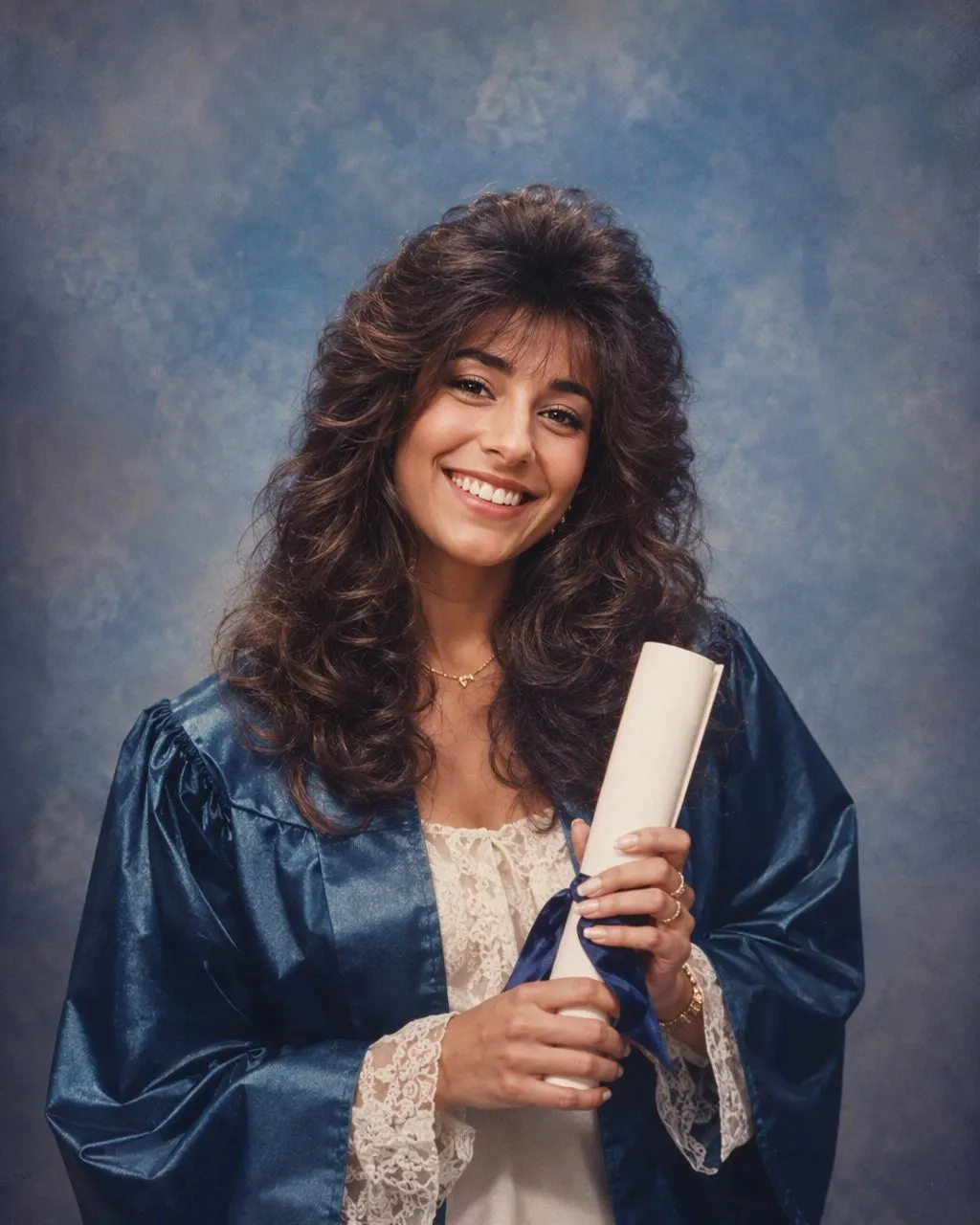
To make a ChatGPT 80s photo, upload one clear photo and paste this: “Keep my face, facial features, skin tone, expression and body shape exactly as they are in this photo. Change only my hair, clothes, accessories and the setting. Restyle it as a mid-1980s studio portrait: big feathered or permed hair with height at the crown, a blazer with shoulder pads or a pastel polo with the collar up, large plastic earrings, a mottled grey-blue canvas backdrop, direct on-camera flash with a hard shadow behind the shoulder, soft film grain and slightly faded warm colour. Output one still photograph.” The identity line goes first because everything else depends on it.
That prompt works because it makes the six decisions ChatGPT would otherwise make for you: what stays, what changes, the hair, the clothes, the light and the film. What it cannot fully control is consistency. ChatGPT re-decides the whole image every run, so the same prompt on the same photo can return a slightly different jaw or eye spacing on the second or third attempt. The fix when it drifts is to reply that the face must match the original exactly, which costs you another round.
If you would rather not write anything, FaceCast has the 80s look built in as a fixed style: upload one photo, tap the style, and the portrait comes back in seconds with your face, skin tone and expression kept and only the hair, clothes, accessories and backdrop moved to the mid-80s. Free on iOS and Android, no prompt, no account to try.



How to Get an 80s Photo Out of ChatGPT
Upload one photo and paste the prompt
Use a front-facing photo in even light. Paste the full prompt above with the identity line first. Do not shorten it to “make me 80s”; that is exactly the version that hands back a stranger in a perm.
Check the face, not the hair
Compare the result to the original at the jawline, the nose and the distance between the eyes. The hair will always look convincing; the face is the part that decides whether the picture is of you.
Correct or switch routes
If it drifted, reply: “The face must match the original exactly; change only hair, clothes and background.” If it drifts again, the fixed style in FaceCast is the shorter road: same look, face held on every run.
The Six Lines of a Working ChatGPT 80s Prompt
Read as a checklist rather than a magic phrase, the prompt is six instructions. Every one is a decision the model will make on its own if you leave it out.
1. The identity lock
Face, features, skin tone, expression and body shape stay exactly as they are. This line is not optional and it goes first.
2. What may change
Hair, clothes, accessories and setting, and nothing else. Naming the list closes the door on the model deciding to “improve” anything.
3. The hair
Feathered layers or a perm with height at the crown, a swept fringe, hairspray shine. For men, a fuller side part or a mullet.
4. The clothes
Shoulder pads, a denim jacket, a collar-up pastel polo, a satin blouse with a bow, big plastic earrings, aviator frames.
5. The light
Direct on-camera flash: a bright, slightly hot face, a hard little shadow behind the shoulder, corners that fall away.
6. The film and the backdrop
Soft grain, slightly faded warm colour, and a mottled canvas or pastel gradient backdrop. This is the part most people leave out, and it is the part that carries the decade.
The ChatGPT 80s Yearbook Version
The yearbook photo is the same prompt with two additions: “pose as a school yearbook portrait, shoulders angled slightly, head turned to the camera, chest-up crop” and “plain mottled grey or blue studio backdrop, no props”. The flash, the hair and the identity line stay as they are. For a prom version, swap the backdrop line for a balloon arch or a satin drape and add a corsage or a boutonniere.
This is the variant Filipino searches ask for most, and it makes sense: the mid-80s yearbook and prom photo is a picture almost every family already owns. That gives you a reference. Put the ChatGPT result next to a parent’s or a tita’s actual yearbook portrait and check the flash and the backdrop against the real print. FaceCast has the yearbook and prom versions as built-in looks too, linked below.
Why ChatGPT Changes Your Face Between Attempts
A free-text prompt drifts the face because every run generates a new image from your words and your photo together. The sentence is a description, not a measurement. How tightly ChatGPT holds to your original geometry depends on the wording, on the rest of the prompt and on the run itself. Soften “keep the face exactly as it is” to “keep me recognisable” and you have loosened the constraint without noticing.
You can check this in two minutes: run the same prompt on the same photo three times and compare the three results at the jawline. On most photos, at least one has moved. It moves most on group shots, where one identity instruction has to hold several faces at once. A fixed style behaves differently for a structural reason: the identity handling is the same code on every run, so what varies between two results is the photo, not the sentence. That is a difference in how the two are built, not a claim that one makes prettier pictures.
Whichever route you take, the output is one still image. No video, no ageing anyone up or down, no celebrity faces, nothing you could use as an ID photo. FaceCast uses your photo only to generate your result; it is not sold or shared for marketing. Upload your own picture, or one everyone in it agreed to, and add a short “made with AI” note when you post the result.
Frequently Asked Questions
What is the ChatGPT 80s photo prompt?+
Start with the identity line: keep the face, features, skin tone, expression and body shape exactly as they are, and change only hair, clothes, accessories and setting. Then describe the photograph: mid-1980s studio portrait, big feathered or permed hair, shoulder pads or a collar-up polo, a mottled canvas backdrop, direct on-camera flash, soft film grain and slightly faded warm colour. Ask for one still image.
How do I make a ChatGPT 80s yearbook photo?+
Use the same prompt and add a pose line, “school yearbook portrait, shoulders angled, head turned to camera, chest-up crop”, and a backdrop line, “plain mottled grey or blue studio backdrop, no props”. Keep the identity line first. For prom, swap the backdrop for a balloon arch or satin drape and add a corsage.
Why does my face look different in the ChatGPT 80s photo?+
Because ChatGPT re-decides the whole image on every run and your prompt is a description rather than a measurement of your face. Reply that the face must match the original exactly and that only hair, clothes and background may change. If it keeps drifting, a fixed style like the one in FaceCast holds the face the same way on every run.
Is the 80s prompt the same in Gemini?+
Yes, the same six lines work in Gemini with the identity line first. What differs is how many images your plan allows and how each tool handles a follow-up correction. There is a separate Gemini page linked below with the wording laid out for it.
Can I make an 80s photo without a prompt?+
Yes. FaceCast has the 80s look as a fixed style: upload one photo, tap the style, and the portrait is ready in seconds with the face kept. There is nothing to write or configure, and it is free on iOS and Android.
Is it safe to upload my photo to ChatGPT or to an app?+
Your face is biometric data, so check what any tool does with it. FaceCast uses your photo only to generate your result; it is not sold or shared for marketing. Upload your own photo or one everyone in it has agreed to, and label the result as AI when you post it.
Skip the Prompt Entirely
Upload one photo, tap the 80s look, and the portrait is ready in seconds with your face kept. Nothing to write. Free on iOS and Android.
4.6average rating · 4,109 App Store