
Trending now
How to Make 80s Senior Pictures With AI
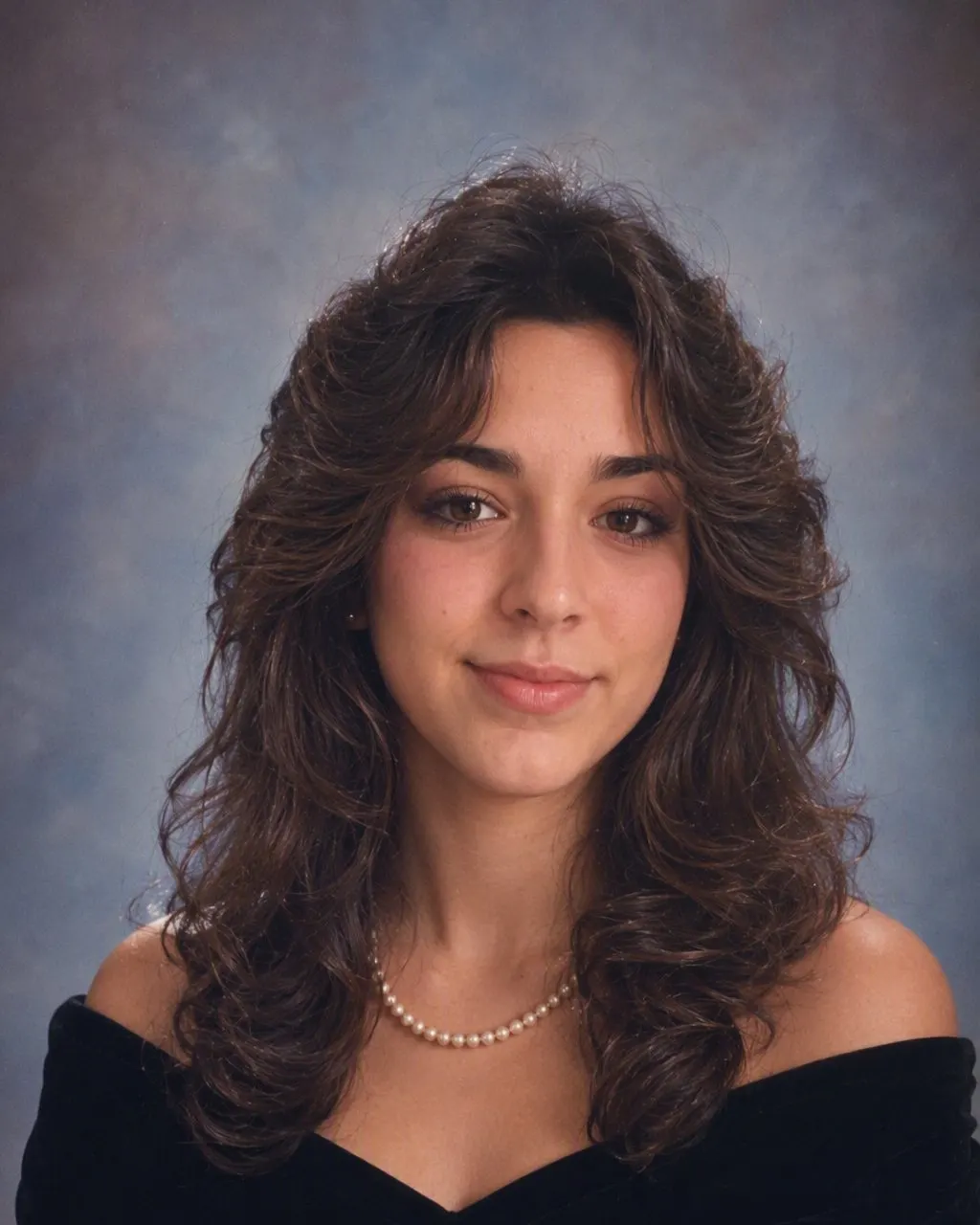
The black velvet drape, the ruffled tux, the mottled studio canvas and the soft studio flash — applied to a portrait you already have, in seconds, with your own face untouched.
4.6average rating · 4,109 App Store
The Short Answer
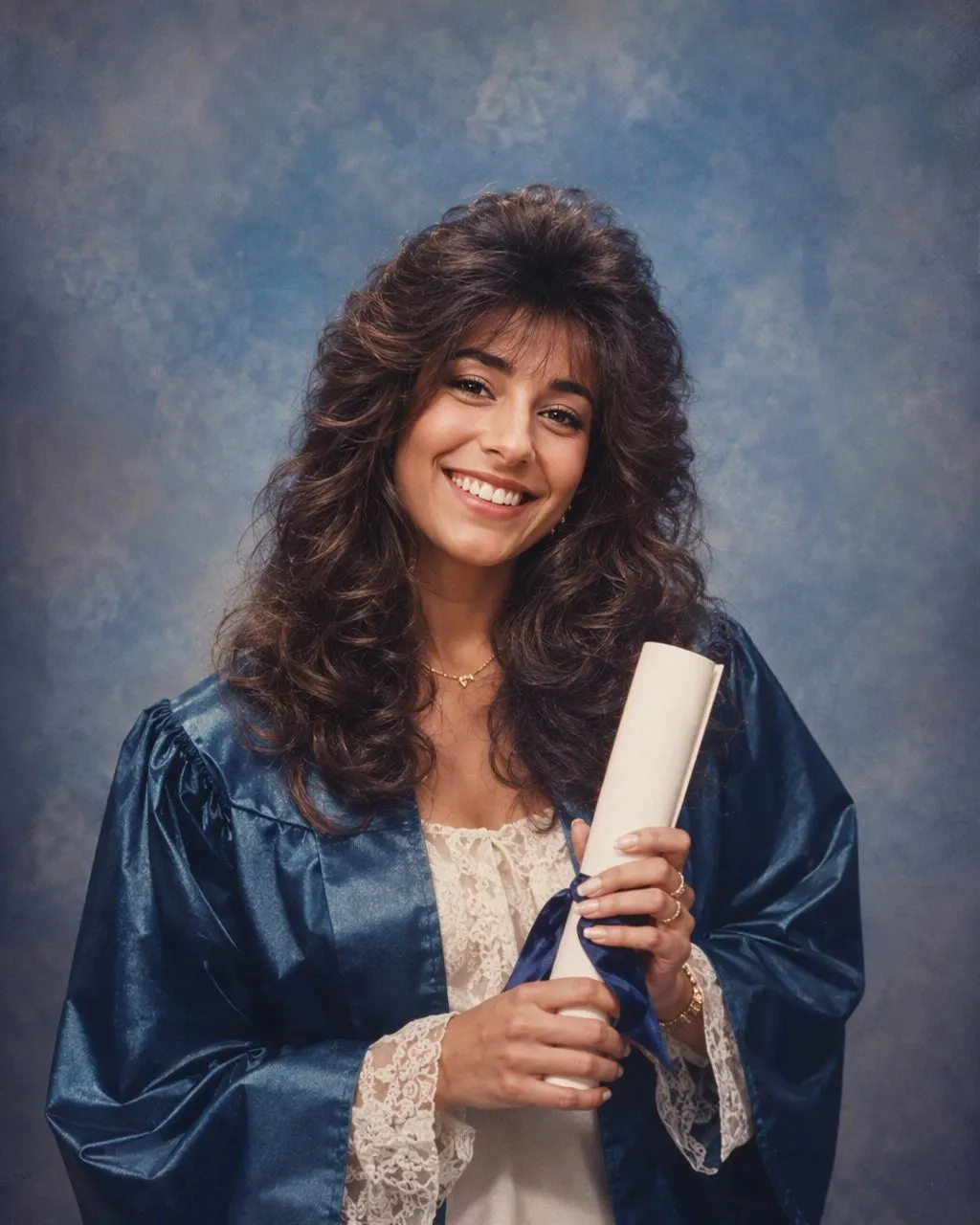
To make 80s senior pictures with AI, upload one portrait you already have, choose the 80s look, and the restyled sitting comes back in seconds. FaceCast keeps your face, skin tone and expression and changes the hair, the clothes and the backdrop to the mid-80s: big soft curls, a velvet drape or a ruffled tux, a mottled studio canvas.
Senior pictures were their own genre. They were shot by a studio the school had contracted, on a booked appointment, with a wardrobe that was handed to you rather than chosen — which is why they all look so alike, and why the era is so easy to reproduce. The app rebuilds the formula rather than a specific studio. Senior pictures are an American ritual specifically: the velvet drape and the tuxedo front were never handed out in Australian, New Zealand or British schools, where the final-year portrait was taken in school uniform. If that is the picture you have, the yearbook page is the closer match.
This is a restyle of a photograph you already own, not a substitute for a real sitting. It produces one still image, never a video, and it does not age anyone. If you need portraits for an actual yearbook deadline, that is still a job for the photographer your school works with.



How to Make Your 80s Senior Portrait
Pick a portrait you already have
Head and shoulders, facing the camera, in even light. Your real senior picture works; so does a plain selfie against a blank wall.
Choose the 80s look
Tap the 80s style and the era wardrobe, backdrop and studio flash are applied at once. Nothing to describe, nothing to set up.
Save and share it
The portrait is ready in seconds. Post it next to the real one — the pair is the joke — and mark the restyled version as AI-made.
The Black Velvet Drape and the Ruffled Tux, Explained
Two wardrobe props defined mid-80s senior pictures, and neither of them belonged to the person being photographed. Girls were handed a black velvet drape — a length of fabric pinned around the shoulders off-camera, so the portrait showed bare shoulders and a soft black frame and no clothing at all below the collarbone. Boys were handed a tuxedo front: a jacket, a bow tie and often a ruffled shirt, worn as a bib over whatever they had arrived in.
Both existed for the same reason. The studio wanted every portrait on a yearbook page to be visually identical, and clothing was the one variable it could not control across four hundred appointments. Drape and tux made everyone match, kept the eye on the face, and meant nothing in the picture could date badly — which is very funny, because the drape and the tux are now the single most dateable thing in the frame.
The 80s look reproduces both, chosen to suit the portrait you upload rather than assigned by anyone. It is the detail people recognise before they consciously identify the decade, and it is the reason a restyled portrait reads as senior pictures rather than as a generic 80s selfie.
What Else Mid-80s Senior Pictures Had
Beyond the drape and the tux, the genre ran on a short list of studio habits. All of them are in the restyle.
Big, soft hair
A perm with volume at the crown, feathered layers around the face, or a long side-swept fringe held in place with a great deal of hairspray.
A mottled canvas backdrop
The blue-grey or brown marbled canvas that hung in every contracted studio, lit softly enough to blur out at the edges.
Softer light than a class photo
Senior sittings got a real softbox and a hair light rather than a single hard flash, so the portrait glows where a class photo glares.
An airbrushed finish
Retouching was done by hand on the print, which smoothed skin into something slightly waxy and left a distinctive glow that no modern filter quite copies.
A three-quarter shoulder turn
Shoulders angled away, head brought back towards the lens, chin a fraction down — the pose every studio used, on everybody.
A Restyle, Not a Replacement for Your School Photographer
Real senior portraits are a craft and an industry: studios under contract to schools, booked sittings, retouching, print packages, and deadlines that land in September and October. Nothing on this page competes with any of that. What FaceCast does is take a photograph that already exists and put a decade around it, for fun, in a few seconds — free, one tap, no prompt to write and no account to create.
The most enjoyable way to use it is alongside the real thing. Post the actual portrait and the mid-80s version side by side, or run the whole friend group through the same style so everyone gets the same drape and the same backdrop, the way the studio would have done it.
The usual rules apply. Upload your own photo, or one the person in it has agreed to — never a classmate’s picture pulled from a page. Keep it to adults. Say it was made with AI when you post it. And know what the tool does not do: no video, no ageing, no celebrity faces, and your photo is used only to generate your result, not sold or shared for marketing.
Frequently Asked Questions
How do I make 80s senior pictures with AI?+
Upload one head-and-shoulders portrait, choose the 80s look, and the restyled sitting is generated in seconds. FaceCast keeps your face and expression and changes the hair, wardrobe and backdrop to the mid-80s. There is no prompt to write and it is free on iOS and Android.
What was the black velvet drape?+
A length of black velvet pinned around the shoulders off-camera during a studio sitting, so the portrait showed bare shoulders framed in soft black rather than the person’s own clothes. Studios used it to make every portrait on a yearbook page look identical. Boys got the equivalent: a tuxedo front with a bow tie, often over a ruffled shirt.
Can this replace my real senior portrait?+
No, and it is not meant to. School portraits are shot by a contracted studio to a deadline and printed to a package. This restyles a photo you already own, as a novelty, and produces one still image you should label as AI-made.
Will it change my face?+
No. Your face, skin tone and expression stay exactly as they are. Only the hair, clothes, accessories and background move to the mid-80s, along with the studio flash and film grain that make it read as a print from the era.
Can I choose the drape or the tux?+
The 80s look picks the wardrobe that suits the portrait you upload; there is nothing to type or select. If you want the other version, upload a different photo — framing, clothing and hair in the source all influence which direction the restyle takes.
Is it safe to upload my photo?+
A photo of your face is biometric data, so the question is a fair one. FaceCast uses your photo only to generate your result; it is not sold or shared for marketing. Upload your own picture, or one the person in it has agreed to, and never somebody else’s portrait.
Get the Drape, the Tux and the Backdrop
Upload one portrait, choose the 80s look, and your mid-80s sitting is ready in seconds. Free on iOS and Android.
4.6average rating · 4,109 App Store