
Trending now
80s Filter for Instagram: What People Are Actually Using
Everyone is searching for an 80s filter on Instagram, and the reels are real — but the effect is not a filter inside the app. Here is what makes those photos, the prompt route, and the one-tap route.
4.6average rating · 4,109 App Store

Is There an 80s Filter on Instagram?
No — there is no built-in Instagram filter that gives you the 80s trend. Instagram’s own filters and effects change the colour, the grain and the light on your photo, so they can make a picture look older, but they cannot change your hair, put you in a shoulder-padded blazer or a chiffon dupatta, or replace the room behind you with a mottled studio backdrop. The photos you are seeing in reels are made outside Instagram — with an AI image tool or an app — and then posted there.
There are two honest routes to that look. One is a prompt: attach your photo to ChatGPT or Gemini and ask for a mid-1980s studio portrait with the identity line first — keep the face, features, skin tone and expression exactly as they are, change only the hair, clothes, accessories and setting, then a direct on-camera flash, soft film grain, faded warm colour and a plain mottled backdrop. That works, but the face drifts between attempts, because a free-text prompt regenerates the whole image every run.
The other route is a fixed style. FaceCast has the 80s look built in: upload one photo, tap the style, and the portrait comes back in seconds with your face, skin tone and expression kept and only the hair, clothes, accessories and background moved to the mid-80s. Free on iOS and Android, one photo, nothing to type — then save it and post it to Instagram like any other picture.
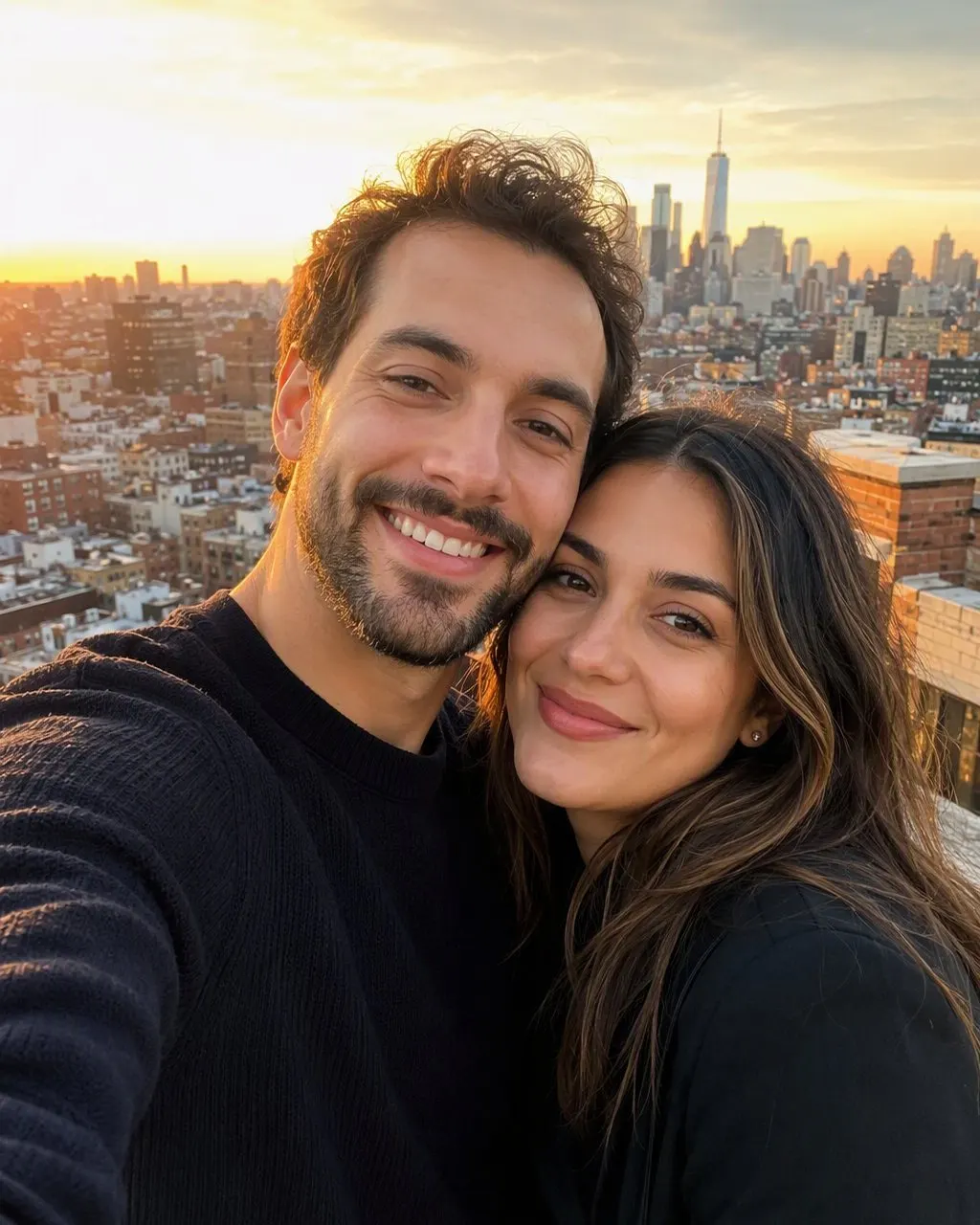


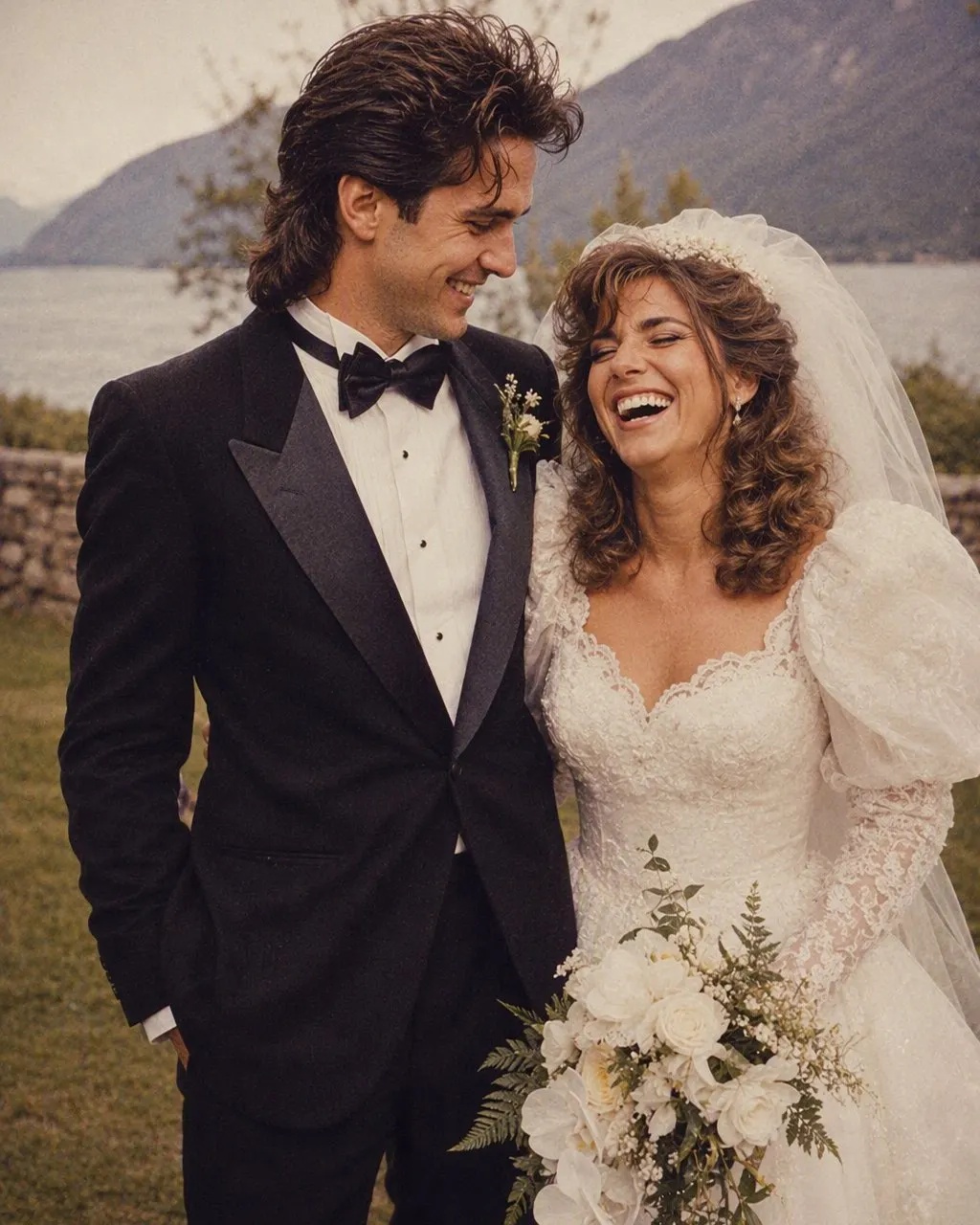
How to Get the 80s Look for Instagram
Pick a clear, front-facing photo
One face, evenly lit, nothing across the eyes or the jaw. A dim or half-turned photo is the one that comes back looking like somebody else, whichever route you take, because the tool has to invent the half it cannot see.
Make the image outside Instagram
Either paste the prompt into ChatGPT or Gemini with your photo attached, or open FaceCast and tap the 80s style. FaceCast takes seconds and needs no prompt; the chat route gives you control of the outfit but usually needs two or three tries before the face matches.
Save it and post it as a normal photo
The result is a still image on your camera roll — post it to your feed, your story or a reel like any picture. Add a short “made with AI” note in the caption; it is honest and it is what the platforms ask for.
What Instagram Filters Can and Cannot Do
It helps to separate the two things people mean by “80s filter”. One is a colour treatment; the other is a restyle. Instagram does the first and cannot do the second.
What a filter changes
Colour, contrast, warmth, grain, a light leak, a soft vignette. All of it sits on top of the photo you already took. This is real, and it will make a picture look like an old print.
What a filter cannot change
Your hair, your clothes, your jewellery, the room behind you. Those are objects in the picture, not a colour layer, and no filter replaces them.
What the trend actually needs
Volume at the crown, feathered or permed hair, shoulder pads or a chiffon dupatta, big earrings, and a plain mottled studio backdrop under a hard flash — the look of a mid-80s PTV drama publicity still. That is a restyle, so it takes an AI image tool.
Where the face is at risk
Anything that regenerates the picture can also regenerate your face. Whether you use a prompt or an app, check the result at the jawline, the nose and the eye spacing before you post it.
The Prompt Route, Written Out
If you want to try the chat route, this is the text: “Keep my face, facial features, skin tone and expression exactly as they are in this photo — same person, same angle, do not lighten the skin. Change only the hair, the clothes, the accessories and the setting. Make it a mid-1980s studio portrait: voluminous hair with height at the crown, feathered or lightly permed; a shoulder-padded blazer or a wide-collar shirt, or a printed silk shalwar kameez with a chiffon dupatta; large earrings or a thin gold chain; direct on-camera flash with a small hard shadow behind the shoulder; soft film grain; slightly faded warm colour; a plain mottled studio backdrop. Photorealistic, like a 1986 studio print.”
The identity line goes first for a reason: it is the only instruction the model will otherwise decide for itself, and buried after the costume list it stops holding. The same text works in ChatGPT and in Gemini — “nano banana” is the nickname of Gemini’s image model, so a nano banana 80s filter prompt is this text pasted into Gemini. Expect to run it two or three times and to reply “the face must match the original photo exactly” at least once.
Posting It Honestly
FaceCast makes a still image from one photo. It does not make video, it does not age anyone up or down, it does not put a celebrity’s face into a picture, and it does not restore damaged photos. Your photo is used only to generate your result; it is not sold or shared for marketing.
Two habits worth keeping when you post: use your own photo, or one that everyone in it agreed to, and say in the caption that the image was made with AI. Neither costs you anything, and both save the awkward reply under the post.
Frequently Asked Questions
Is there an 80s filter on Instagram?+
Not one that does the trend. Instagram’s filters change colour, grain and light, so they can make a photo look like an old print, but they cannot change your hair or clothes or replace the background with a studio backdrop. The reels you have seen were made in an AI tool or an app and then posted to Instagram.
What app is everyone using for the 80s filter?+
Most of the posts come from either a ChatGPT or Gemini prompt or from an app with the style built in. FaceCast is the second kind: upload one photo, tap the 80s look, and the portrait is ready in seconds with your face kept. It is free on iOS and Android.
How do I post the 80s photo on Instagram?+
Save the result to your camera roll and post it like any other picture — feed, story or reel. Add a short “made with AI” note in the caption so nobody is misled about what they are looking at.
Why does my face change with the 80s filter prompt?+
Because a free-text prompt regenerates the whole image on every run and holds your face only as tightly as the wording. Put the identity line first, add “do not lighten the skin”, and if it still drifts, reply that the face must match the original exactly. A fixed style keeps the face on every run instead.
Is the 80s filter free?+
The FaceCast route is free to try on iOS and Android with no account, and there is nothing to type. The chat route depends on your ChatGPT or Gemini plan, which limits how many images you can generate.
Is it safe to upload my photo for an 80s filter?+
Your face is biometric data, so check what any tool does with it. FaceCast uses your photo only to generate your result; it is not sold or shared for marketing. Whichever route you take, upload your own photo or one everyone in it agreed to.
Make the Photo, Then Post It
Upload one photo, tap the 80s look, and the portrait is ready in seconds with your face kept. Free on iOS and Android — nothing to write.
4.6average rating · 4,109 App Store