
1980s photo trend
The 1980s Photo Trend
Everyone can tell a photo from 1986 at a glance, and almost nobody can say why. It comes down to four things — the flash, the film, the backdrop and the hair — and once you can name them you can see exactly what the trend is reproducing.
4.6average rating · 4,109 App Store
What makes a photo look like 1986
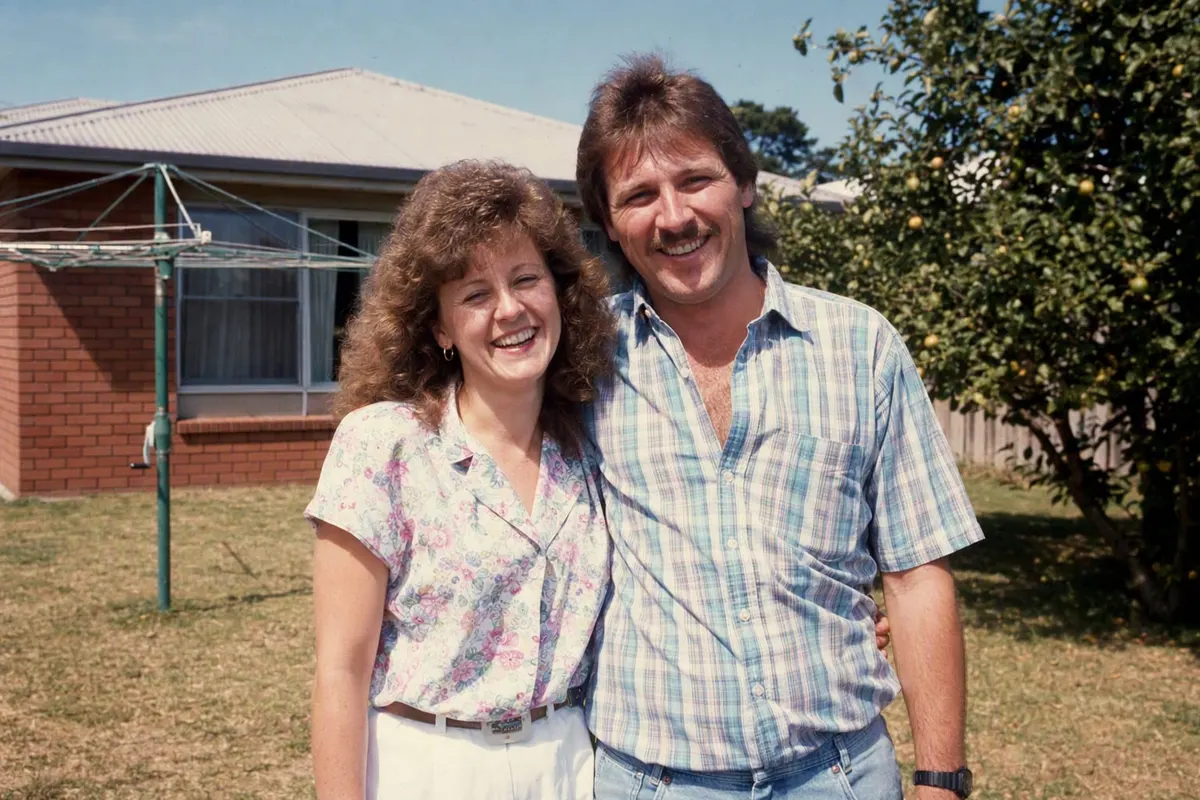
Four things, in the order your eye notices them. The flash: almost every indoor photo was lit by a compact camera’s on-camera flash, which puts a bright flat light on the face, a hard edge along the hairline and a short dark shadow on the wall behind the shoulder. The film: colour negative at 200 or 400 ASA, giving a fine even grain that sits a little heavier in the shadows. The colour: thirty years in an album shifts reds and yellows towards warm, pushes blues towards green and lays a faint magenta over the shadows. And the hair, which had more height and volume than any decade before or since.
Add the backdrop and you have the whole set. In Australia that means one of two rooms: the school photographer’s mottled blue-grey canvas with two thin laser streaks across it, or a brick-veneer living room with a wood-grain wall unit. Outdoors it means a backyard in harsh summer sun with a rotary clothes hoist somewhere in the frame.
The trend reproduces all of that from a current photo. FaceCast does it from a single upload with your face preserved — no prompt, a few seconds, free on iOS and Android. What changes is the hair, the clothing, the backdrop and the light; what does not change is you.
Getting the 1980s look from a photo you already have
Choose a photo with a clear face
Front-on, sharp, daylight, no sunglasses and no beauty filter. Avoid Portrait mode — 1980s compact cameras had deep focus, not a blurred background.
Restyle rather than filter
A colour filter gets the tint and stops there. The 80s style in FaceCast changes hair, clothing, backdrop, flash and grain together, which is what makes the result read as a print rather than an edit.
Post the pair
The 1986 version first, the original second. Add the AI label when you post and mention it in the caption.
The four markers, in detail
On-camera flash
A single hard light source a few centimetres from the lens. Faces are evenly bright, backgrounds fall away dark, and there is a crisp shadow just behind the shoulder. Nothing in a modern phone photo looks like it.
Film grain
Fine and even across the frame, stronger in the shadows than the highlights. Digital noise looks different — coloured, blotchy, concentrated in dark areas.
Aged colour
Warm reds and yellows, blue-greens, magenta shadows, and highlights that never quite reach white. This is dye fade, and it is why scans of old prints all share a family resemblance.
Hair with height
Perms, blow-dried feathered cuts, mullets and deep side parts. More volume than the decades either side, and the fastest visual date stamp there is.
The Australian versions of the 1986 photo
The school photo
Mottled blue-grey canvas, two or three thin laser streaks, a hard frontal flash, and a summer uniform. Almost every Australian household has one in a drawer.
The backyard
Harsh midday sun, a rotary clothes hoist, buffalo grass, a brick-veneer house behind. Everyone squinting, because there was no such thing as waiting for good light.
The beach
Zinc cream, surf lifesaving flags, a headland in the background and a weak fill flash fighting the sun.
The school formal
Puffed sleeves, a wide-lapel dinner jacket and the photographer’s backdrop, shot at the start of the night before anyone moved.
Christmas in summer
A hot December lunch, paper hats, a tube television on in the corner and the flash bouncing off the tablecloth.
Filter or restyle — which one you actually want
A retro filter app adds grain, light leaks and a date stamp over the photo you took today. You still have today’s haircut and today’s clothes underneath, which is why those results get a polite reaction and the trend photos get a comment thread.
A restyle reinterprets the photograph: the hair gains volume, the jacket gains shoulders, the room becomes a studio, and the light becomes a flash. That is the difference between a photo that looks aged and a photo that looks taken. Your face carries across either way, so the comparison still reads as you.
Common questions
What is the 1980s photo trend?+
Taking a current photo and restyling it so it looks like it was taken in 1986 — period hair and clothing, a studio or living-room backdrop, hard on-camera flash and faded film colour — then posting it next to the original. Your face stays the same.
Why do 1980s photos look like that?+
On-camera flash, 200–400 ASA colour negative grain, dye fade that warms reds and greens the blues, and hairstyles with far more volume than the decades either side.
How do I make a photo look like the 1980s?+
Upload one clear front-on photo to FaceCast and tap the 80s style. Hair, clothing, backdrop, lighting, colour and grain change together; your features stay. It takes seconds and needs no prompt.
Is there an app for the 1980s photo trend?+
FaceCast, free on the App Store and Google Play. ChatGPT and Gemini can also do it, but they need a written prompt and usually a few attempts.
What was the blue background in 1980s school photos?+
A mottled canvas backdrop, usually blue-grey, often with two or three thin laser streaks added by the photographer. It is one of the most recognisable markers of the period and it is one of the styles in the app.
Do I need to label the result as AI?+
Yes — use the AI label your platform provides and mention it in the caption. It is the honest thing to do and several platforms require it.
See yourself in 1986
One photo, a few seconds, your face intact. Free for iOS and Android.
4.6average rating · 4,109 App Store