
Trending now
The 80s School Photo Laser Background, and How to Get It Behind Your Own Photo
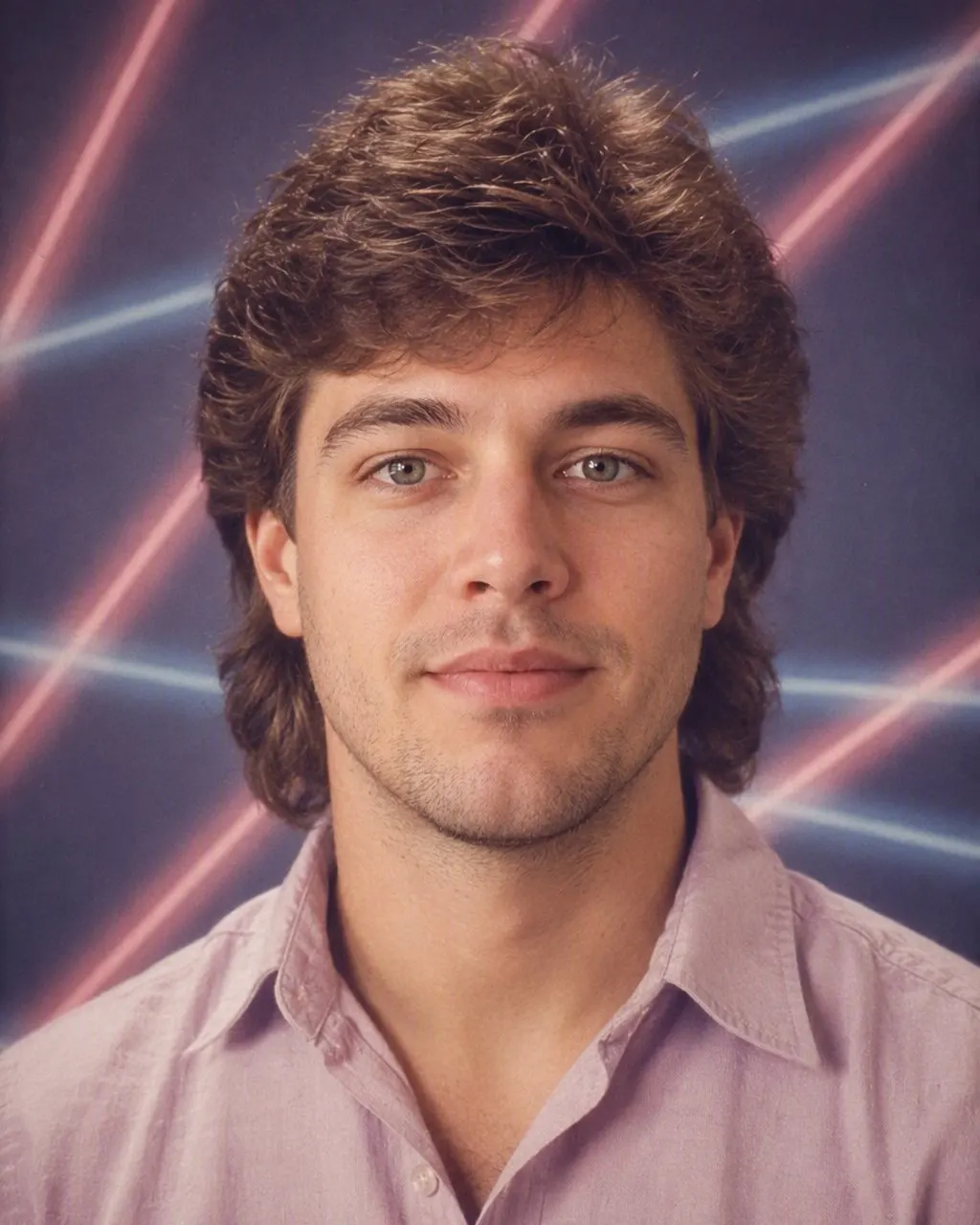
Pink and blue beams fanning out of a black void, a hard flash and a fresh mullet — the backdrop every Australian who went to school in the 80s remembers, put behind a picture you already have.
4.6average rating · 4,109 App Store
The Short Answer
The 80s school photo laser background is a black backdrop crossed by fanning pink and blue beams, hung by the school photographer on photo day across Australia through the 80s and into the 90s. To put it behind your own portrait, upload one photo to FaceCast and tap the 80s look: your face is kept, and the backdrop, the hard flash, the hair and the collar are rebuilt around it in seconds. It is free on iOS and Android and there is no prompt to write.
There was never an actual laser. The design was printed or painted on a roll of canvas, sometimes drawn in-camera with a second exposure through a shaped filter, then lit from the side so the beams glowed against an unlit black field. It travelled in the photographer’s van with the mottled blue-grey canvas and the pastel gradient, and which one your school got depended on the year, the company and the package your parents ticked on the envelope.
Because it is so specific, it dates a photograph faster than any haircut. Put those beams behind a face and the picture reads as an Australian school photo from the 80s before anyone has looked at the mullet.



How to Put the Lasers Backdrop Behind Your Photo
Upload a head-and-shoulders portrait
Front-on, evenly lit, with a simple background behind you. A plain wall gives the cleanest replacement.
Tap the 80s look
The backdrop comes with the rest of the era — the flash, the hair, the collar — and there is nothing to type or configure.
Save and share it
The portrait is ready in seconds. Post it with a short “made with AI” note so it is not mistaken for a real print out of the family album.
Photo Day: How the Lasers Ended Up Behind Half the Country
School photos in Australia were an industrial operation. Once a year the photographer’s company arrived with a van, set up one lighting rig and a rack of canvases in the hall or the library, and shot the whole school in a day: the individual portrait first, class by class, then the class photo on the benches outside with the teacher at the end of the row. Every kid took home the same envelope, and every family ticked the same boxes — the pack of wallet-sized prints, the one for Nan, sometimes the laminated key ring.
The lasers backdrop was the option that made the portrait look like the future rather than like a passport photo. The design is simple: a black field with narrow beams of magenta and cyan radiating from one or two off-centre points, sometimes with a starburst where they meet, occasionally with a grid running underneath. The beams are hard-edged and dead straight because they were printed rather than photographed; the black around them is genuinely black because nothing lit it; and the colours are magenta and cyan rather than red and blue because that is what the print dyes of the period rendered most vividly against black.
Set against a subject hit by direct on-camera flash — a slightly too-bright face, a hard little shadow behind the shoulder, the fringe shining with hairspray — the result is the exact combination that reads as an 80s school photo. It was never universal, though. Which company your school hired and which backdrop was on the rack that year decided whether you got the beams, the mottled canvas or the plain gradient, which is why some people have three years of lasers and others none at all. The design never entirely went away either; backdrop suppliers still sell it.
The Rest of the Uniform: What the Restyle Adds Around the Backdrop
The backdrop on its own does not make the picture. The restyle rebuilds the whole frame, and these are the parts that arrive with the beams.
The hair
A mullet, a rat’s tail, a fringe teased up and set with hairspray, or a fresh perm — the haircut everyone had just before photo day and regretted by the time the envelope came home.
The collar
A polo shirt with the collar up, a windcheater over a school shirt, or a jumper with a geometric pattern. Head-and-shoulders only, which is how the backdrop was hung.
The flash
Direct on-camera flash: a bright face floating in front of a background that is a shade too dark, with the corners falling away into the black.
The print
Soft film grain and slightly faded, warm colour, as if the wallet-sized print has lived in a drawer or on a fridge magnet since 1986.
Getting the Lasers on a Photo You Already Have
You do not need to cut yourself out of your photo, find a backdrop file or match the lighting by hand. Upload one portrait, tap the 80s look, and the backdrop, the flash, the hair and the wardrobe are rebuilt together — which matters, because a laser backdrop pasted behind a softly lit modern portrait looks wrong immediately. The hard flash and the black field have to arrive as a pair.
A few things help. Use a photo with a plain background, so there is less to replace; face the camera; keep the light even; and skip any beauty filter, because the restyle adds its own grain and the two fight each other. Full-length photos work less well than head-and-shoulders — the backdrop was hung for a tight frame. It also runs on a couple photo, a group of mates or a family portrait, and everyone keeps their own face.
The rest is the usual: it is free, one tap, no prompt to write and no account to create. It makes a still image, not a video, and it does not age anyone. Your photo is used only to generate your result; it is not sold or shared for marketing. Upload your own photo, or one the person in it has agreed to, and label the result as AI-made when you post it — a convincing fake school photo is exactly the kind of picture that gets shared as the real thing.
Frequently Asked Questions
What is the laser background in 80s school photos?+
A black backdrop crossed by fanning magenta and cyan beams, often with a starburst where they meet, hung by school photographers across Australia through the 80s and 90s. It was printed or painted on canvas, or drawn in-camera with a second exposure — no actual lasers were involved. Whether your school had it depended on which company it hired and what was on the rack that year.
How do I get the 80s school photo backdrop on my own photo?+
Upload one head-and-shoulders portrait to FaceCast and tap the 80s look. The backdrop is rebuilt along with the hard on-camera flash, the hair and the collar, so the whole picture matches rather than looking like a cut-out on a pasted background. It takes seconds and there is nothing to type.
Why were the beams pink and blue?+
Magenta and cyan were the colours the print dyes of the period rendered most vividly against black, and they read as futuristic in a way red and green did not. The same pairing turns up across the era’s graphics, from arcade cabinets to album sleeves.
What were the other 80s school photo backdrops?+
Three appeared on the same rack: the lasers, a mottled blue-grey or brown marbled canvas, and a plain pastel gradient. The premium add-on was not a backdrop at all but the double-exposure portrait — a face looking at the camera with a ghosted profile of the same person beside it.
Does it work on a class photo or a group photo?+
Yes. The same 80s look runs on a couple photo, a group of mates or a family portrait, and everyone in the frame keeps their own face. Tighter framing gives a better result, because the backdrop was hung behind a head-and-shoulders crop rather than a full row on the benches.
Will my face change?+
No. Your face, skin tone and expression are kept as they are. The hair, clothes, accessories and background change, along with the flash and the film grain that make the picture read as a print from the era.
Put the Lasers Behind You
Upload one portrait, tap the 80s look, and the beams, the flash and the grain arrive in seconds. Free on iOS and Android.
4.6average rating · 4,109 App Store